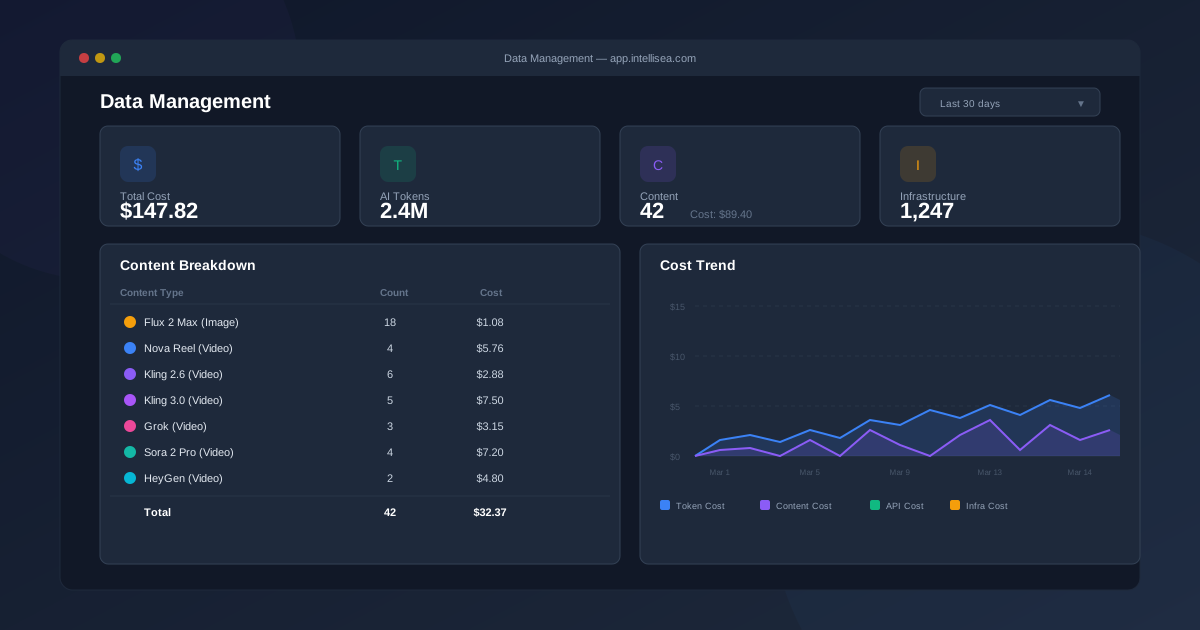
Intellisea tracks every AI operation your organization performs — from chat messages to image and video generation. The Data Management page gives you a complete, real-time view of your usage and costs so you always know exactly where your money is going.
Dashboard Overview
Navigate to "Data Management" from the main sidebar. The page is organized into four sections:
- Summary Cards — High-level metrics at a glance
- Content Generation Breakdown — Detailed table of content costs by model type
- API Usage Breakdown — Token usage and costs for each AI agent
- Cost Trend — A time-series chart showing spending over the selected period
The Summary Cards
At the top of the page, you'll see four summary cards that provide an instant snapshot:
| Card | What It Shows |
|---|---|
| Total Cost | The combined cost across all categories (AI tokens, content generation, API calls, and infrastructure) for the selected date range |
| AI Tokens | Total tokens consumed by your AI agent conversations, with the associated cost displayed below |
| Content | Total number of content items generated (images + videos), with the combined content generation cost |
| Infrastructure | Lambda invocations and infrastructure costs for backend processing |
Each card uses a color-coded icon for quick visual identification. The Content card is particularly useful for tracking your creative output — it shows both the count of generated items and the total dollar cost.
Content Generation Breakdown
Below the summary cards, the Content Breakdown table itemizes costs by content type. Every model you use in the Content Canvas appears here:
| Content Type | Cost Basis |
|---|---|
| Flux 2 Max (Image) | $0.06 per image |
| Nova Canvas (Image) | Per-image pricing |
| Nova Reel (Video) | $0.08 per second |
| Kling 2.6 (Video) | $0.032 per second |
| Kling 3.0 (Video) | $0.10 per second |
| Grok (Video) | $0.07 per second |
| Sora 2 Pro (Video) | $0.15 per second |
| HeyGen (Video) | Per-video pricing |
| Voiceovers | Per-generation pricing |
| Slideshows | Per-slideshow pricing |
Each row shows the number of items generated and the total cost for that content type. This lets you see at a glance which models you use most and where your content budget is being allocated.
API Usage Breakdown
The API Breakdown table tracks token consumption from your AI agent conversations. Each agent's usage is tracked separately, showing:
- Agent name — Which AI agent consumed the tokens
- Input tokens — Tokens sent to the model (your prompts + context)
- Output tokens — Tokens generated by the model (responses)
- Total cost — Dollar cost for that agent's token usage
This breakdown helps you understand which agents you're using most heavily. If you notice one agent consuming significantly more tokens, it might indicate complex research tasks or long conversation threads.
Cost Trend Chart
The Cost Trend section displays a time-series chart showing your daily spending over the selected date range. The chart breaks costs into color-coded areas:
- Token costs — AI conversation expenses
- Content costs — Image and video generation expenses
- API costs — External API call expenses
- Infrastructure costs — Backend processing expenses
Hover over any point on the chart to see the exact daily breakdown. This visualization makes it easy to spot spending trends, identify peak usage days, and plan your budget accordingly.
Date Range Filtering
At the top of the Data Management page, you'll find a date range selector. Use it to filter all data to a specific period:
- Last 7 days — Recent activity snapshot
- Last 30 days — Monthly overview
- Last 90 days — Quarterly view
- Custom range — Pick specific start and end dates
All four sections (summary cards, content breakdown, API breakdown, and cost trend) update simultaneously when you change the date range.
Admin Dashboard (Multi-Org)
If you have admin access, the Admin Dashboard provides a platform-wide view that aggregates usage data across all organizations. It uses the same data sources but rolls up metrics to show:
- Total platform content items and their combined cost
- Per-organization breakdowns for usage comparison
- Platform-wide cost trends for capacity planning
The admin dashboard automatically consumes the same usage tracking Lambda as the per-organization view, so any new content types or cost categories added to the system are immediately reflected in both views.