When you log into Intellisea, you're not just getting a single AI chatbot — you're getting an entire AI marketing team. Each agent specializes in a different domain, has access to different tools, and approaches problems with domain-specific expertise. This guide introduces every agent and shows you how to interact with them.
How the Chat Interface Works
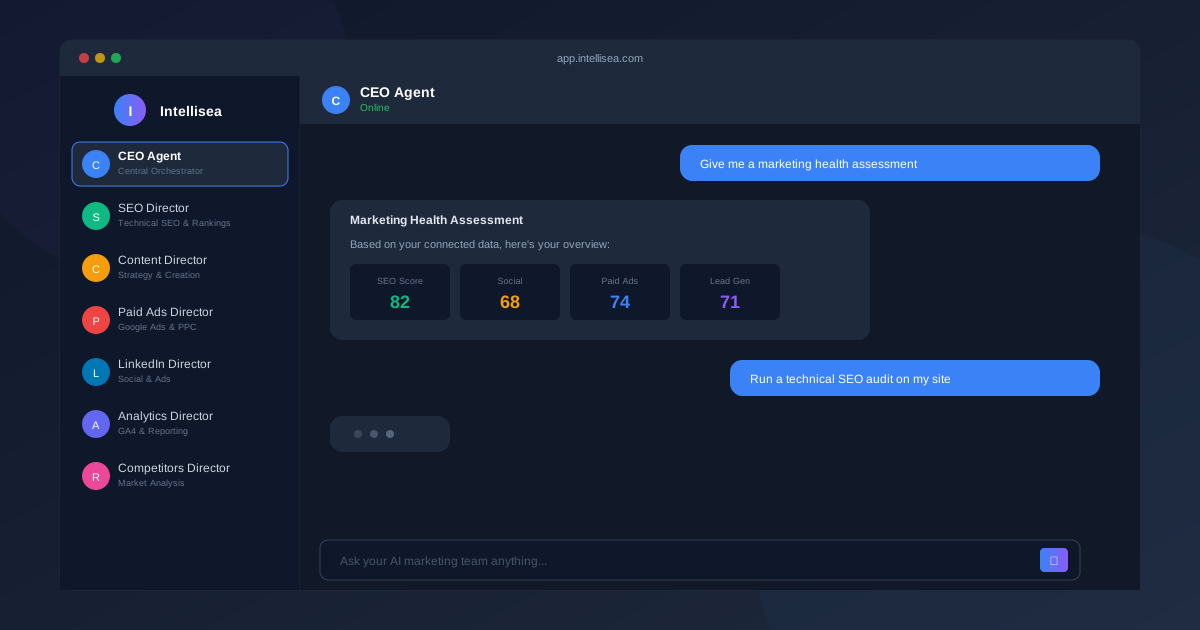
The main dashboard features a chat panel on the right side of the screen. On the left, you'll see a sidebar listing all available AI agents. The chat works like a familiar messaging interface — type your message in the input box at the bottom and press Enter or click Send.
Key elements of the interface:
- Agent Sidebar — Lists all available agents with their icons and specializations. Click any agent to start a conversation with them.
- Chat History — Each agent maintains its own conversation thread. Switch between agents without losing context.
- Message Input — Supports text input with auto-expanding height. Press Enter to send, Shift+Enter for a new line.
- AI Health Score — A real-time score displayed on the dashboard showing your overall marketing health across SEO, social, ads, lead gen, and sales readiness.
The CEO Agent — Your Central Orchestrator
The CEO Agent is the default agent you interact with. It understands your business context, manages conversations, and automatically delegates to specialized directors when needed. Think of it as the team lead who knows when to bring in an expert.
The CEO Agent is best for:
- General business questions and strategy discussions
- Multi-domain requests that span several specialties
- Getting a high-level overview before diving deep with a specialist
Director-Level Agents
Each director agent has specific tools, data access, and expertise. Here's your full team:
- SEO Director — Technical SEO audits, keyword research, backlink analysis, SERP monitoring, on-page optimization, and content gap analysis. Has access to DataForSEO tools for real-time search data.
- Content Director — Content strategy, blog post creation, email sequences, content calendars, and editorial planning. Understands your brand voice and audience.
- Paid Ads Director — Google Ads campaign structure, bid strategies, audience targeting, budget optimization, and ad copy creation. Can analyze connected Google Ads accounts.
- Social Media Director — Platform-specific strategies for LinkedIn, Instagram, Facebook, and X. Posting schedules, engagement tactics, hashtag strategies, and community building.
- LinkedIn Director — Deep LinkedIn specialization with four sub-agents: Strategy Specialist, Content Specialist, Ads Specialist, and Analytics Specialist. Can draft posts, manage campaigns, and analyze organic + paid performance.
- Analytics Director — Google Analytics interpretation, conversion tracking, attribution modeling, and performance reporting. Connects to your GA4 data for real metrics.
- Website Director — Website audits, page speed analysis, UX recommendations, and technical improvements. Uses Google PageSpeed Insights data.
- Competitors Director — Competitor monitoring, market positioning, gap analysis, and opportunity identification. Tracks competitor SEO, ads, and social activity.
- Google Business Director — Google Business Profile optimization, local SEO, review management, and local pack strategy.
Switching Between Agents
To switch agents, simply click on a different agent in the left sidebar. Each agent maintains its own conversation thread, so you can have parallel conversations without them interfering with each other.
You can also let the CEO Agent handle routing automatically. If you ask the CEO Agent a LinkedIn-specific question, it will delegate to the LinkedIn Director behind the scenes. This is often the easiest approach for new users — just talk to the CEO Agent and let it figure out who should handle your request.
Conversation History & Memory
Intellisea's agents maintain persistent memory about your business. This includes:
- Your industry, competitors, and target audience
- Past conversations and recommendations
- Connected integration data (GA4 metrics, search rankings, etc.)
- Your brand guidelines and tone of voice
- Strategies that have been implemented and their results
This means every conversation builds on previous ones. The 10th strategy your agents create will be significantly more tailored than the first.
Best Prompts to Try First
Not sure where to start? Here are some high-impact prompts to try with each agent:
- CEO Agent: "Give me a complete marketing health assessment for my business"
- SEO Director: "Run a technical SEO audit on my website and identify the top 10 issues"
- Content Director: "Create a 30-day content calendar for our blog targeting [your industry] keywords"
- Paid Ads Director: "Analyze our Google Ads account and recommend budget reallocation"
- Social Media Director: "Build a LinkedIn content strategy for B2B lead generation"
- Analytics Director: "What are our top converting pages and where are visitors dropping off?"
- Competitors Director: "Compare our SEO performance against [competitor name]"